

Every database, one workspace, built for speed
Write and optimize SQL with an opt-in AI assistant, visualize complex schemas, edit table data like a spreadsheet, and manage 35+ databases from one cross-platform Pro client.
Connect to SalesDbVisualizer Pro works for every data role on your team
Select your role to see the exact Pro features built for your daily workflow.
Write, debug, and ship SQL faster. Effortlessly.
Stop switching between five different database-specific clients. Connect to every database in your stack from one IDE-grade workspace: generate queries with AI, edit multiple lines at once, and commit SQL scripts directly to Git alongside your application code.

Every schema, object, and execution plan. In view.
Maintain, tune, and administer heterogeneous database estates from a single console. Spot high-cost query nodes visually, navigate massive foreign-key relationships in seconds, and manage procedures, triggers, and scheduled jobs without memorizing vendor-specific quirks.

From raw tables to visual insights. No friction.
Query, filter, and visualize datasets with the power of SQL and the simplicity of a spreadsheet. Build multi-table joins visually without writing syntax from scratch, filter cells on the fly, and turn query results into charts or Excel workbooks in one click.

Cloud warehouses, NoSQL, and local engines. Unified.
Move seamlessly between Snowflake, BigQuery, Redshift, Databricks, DynamoDB, and DuckDB in isolated project workspaces, complete with external script folder mounting, MERGE statement generation, and headless CLI automation.

Enterprise-grade security, simpler licensing. Controlled.
Standardize your engineering and data teams on one vetted desktop client that runs 100% inside your network boundary. Protect credentials with strong encryption, prevent accidental production writes, and simplify procurement with single-key enterprise licensing.

Built for professional database development and enterprise teams
While a basic free version exists for simple read-only queries, DbVisualizer Pro unlocks the complete productivity, automation, and security suite your team needs.
Basic Free Version
Restricted to manual query execution and basic object browsing.
- —Basic database connection & tree browsing
- —Manual SQL query execution only
- ✕No AI Assistant or intelligent query building
- ✕No Git version control or script collaboration
- ✕No inline spreadsheet table data editing or DDL forms
- ✕No Visual Explain Plans, charts, or Excel/JSON exports
- ✕No Command-Line Interface (dbviscmd) or priority support
DbVisualizer Pro
Everything developers, DBAs, and analysts need to build, manage, and optimize databases at scale.
- Opt-In AI Assistant: Generate SQL, explain complex errors, and analyze code directly in the editor
- Native Git Version Control: Clone repos, switch branches, push script changes, and track commit history
- Spreadsheet-Style Data Editor: Edit table cells inline, filter/aggregate selections, and compare grids side by side
- Visual Query Builder & Explain Plans: Drag-and-drop query design plus cost-colored execution graphs
- Full Object & Table Management: Create, alter, and compile tables, views, procedures, functions, and triggers via GUI
- Instant Charts & Advanced Exports: Turn results into visual charts or export to Excel (XLSX), JSON, XML, and MERGE SQL
- CLI Automation & Multi-Workspaces: Run headless jobs via dbviscmd and isolate dev, staging, and prod workspaces
- Enterprise Licensing & Premium Support: Single-key deployment, perpetual fallback rights, volume discounts, and optional Premium Support with 1-business-day developer response
Write and optimize complex SQL in half the time
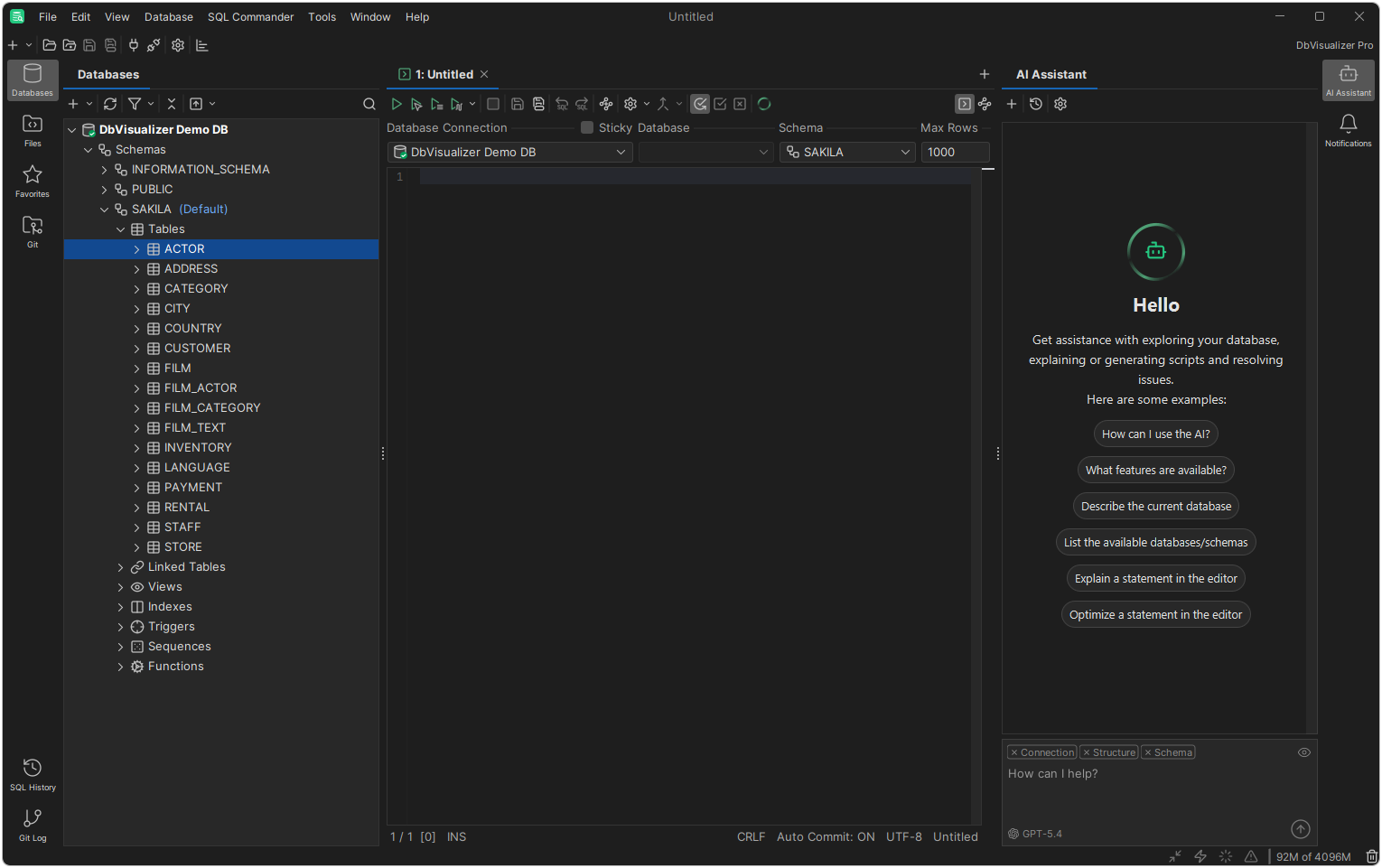
DbVisualizer Pro's overhauled SQL editor pairs a context-aware auto-completion engine with an opt-in AI Assistant, helping your team write cleaner queries, understand unfamiliar schemas, and fix syntax errors without leaving the editor.
- Opt-in AI chat assistant to generate SQL, explain errors, and suggest optimizations
- Privacy-first AI design: shielded from your table data and only uses the schema context you enable
- Intelligent auto-completion, multi-caret editing, and regex Find & Replace
- Visual Explain Plans with cost-based node coloring to tune slow-running queries
Explore schemas visually and edit data like a spreadsheet
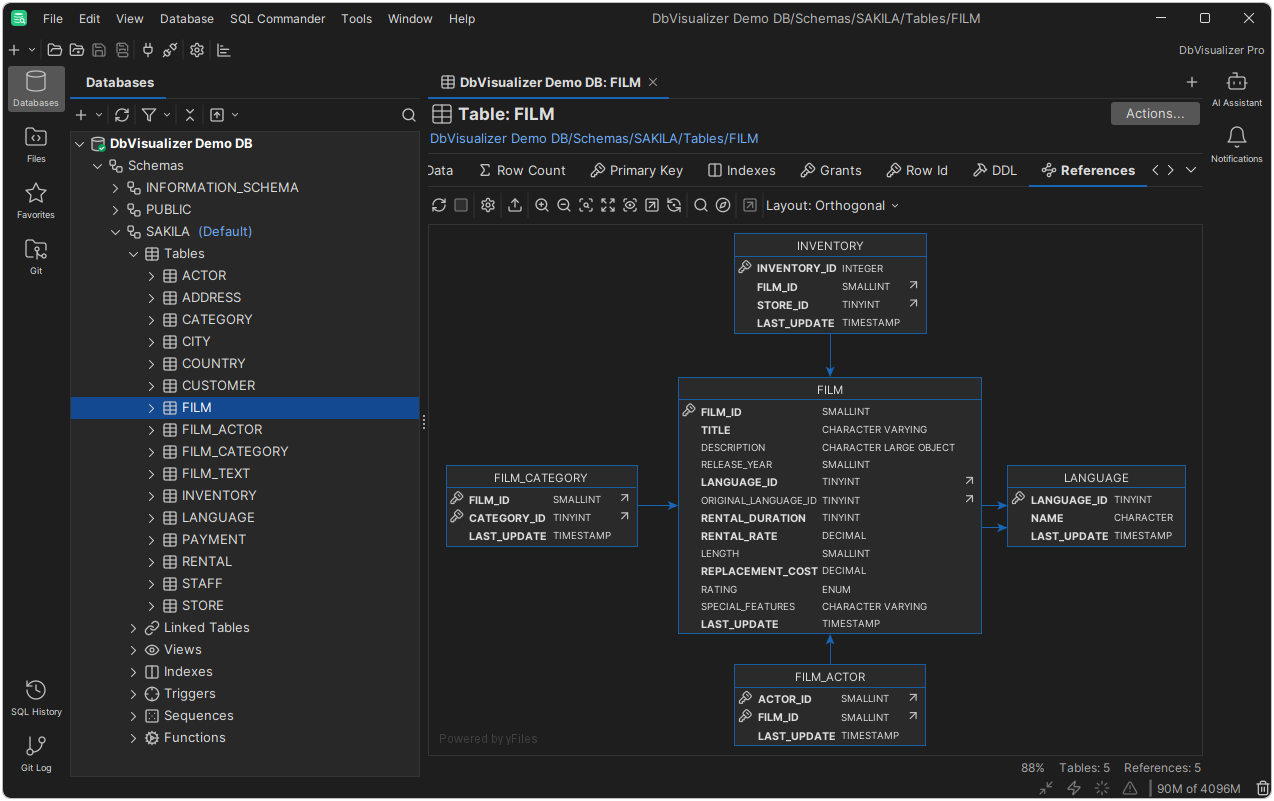
Navigate foreign-key relationships across hundreds of tables at a glance, edit table cells inline without writing UPDATE statements by hand, and turn raw query outputs into visual charts or clean data exports.
- 10x faster reference graphs powered by upgraded metadata caching
- Inline spreadsheet-style grid editor with quick-filter highlighting and cell comparisons
- Drag-and-drop Visual Query Builder that auto-joins tables by primary and foreign keys
- Flexible data exports including SQL MERGE statements, Excel (XLSX), CSV, JSON, and XML
Built for modern Git workflows and strict security standards
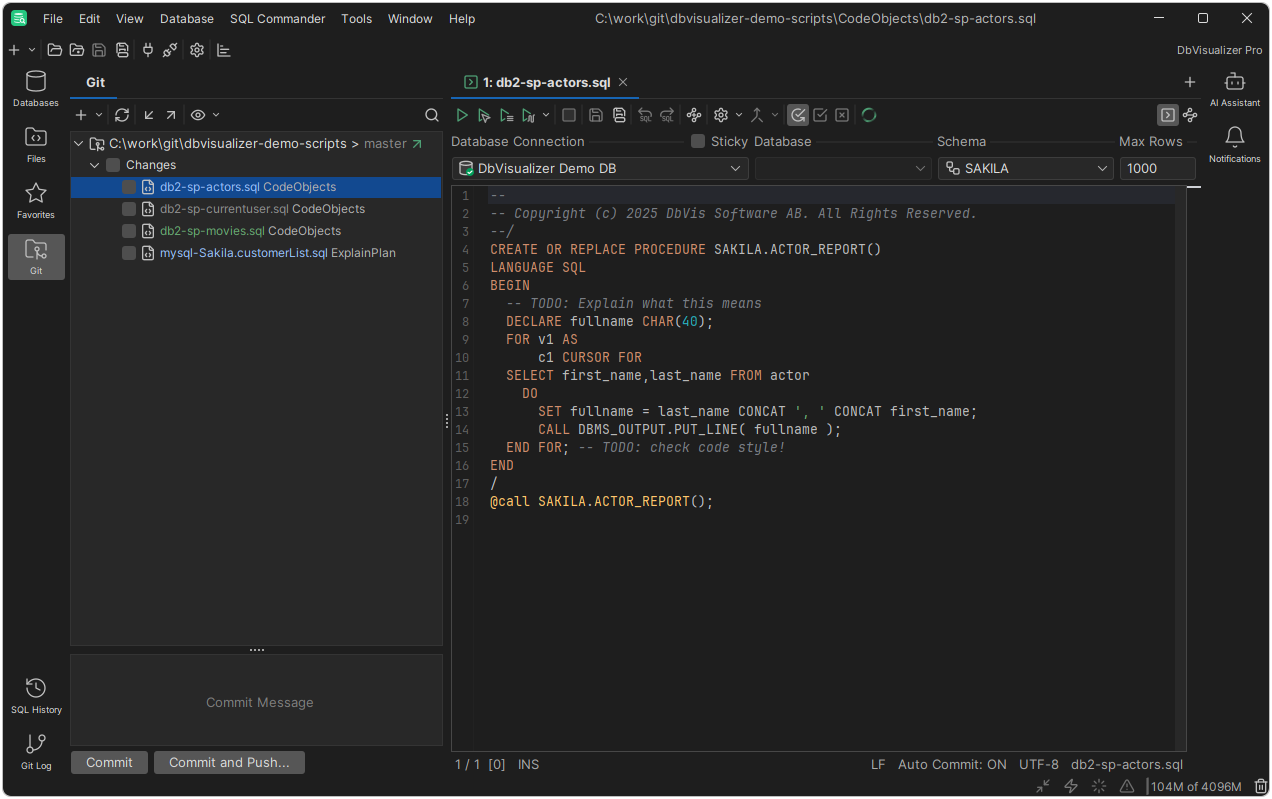
Keep SQL scripts under version control, organize separate client or environment configurations into isolated workspaces, and run everything locally inside your own network boundary.
- Integrated Git support to clone repos, switch branches, push changes, and view commit history
- Dedicated Files tab with async I/O and automatic recall of each script's last connection and schema
- Multi-workspace support to separate production, staging, and project environments cleanly
- Enterprise-ready security with SSH encryption, master passwords, and ISO 27001 / NIST alignment
Connects to 35+ popular databases out of the box
Work with native database object types across relational, cloud warehouse, and NoSQL engines, plus any JDBC-compatible source via the built-in driver manager.
 PostgreSQL
 MySQL
MySQL Oracle & Oracle Cloud
 Microsoft SQL Server
 MariaDB
 IBM Db2
 SQLite
 SAP ASE
 Informix
 Mimer SQL
 Snowflake
 Google BigQuery
 Amazon Redshift
 Azure SQL & Synapse
 Databricks
 ClickHouse
 DuckDB
 SingleStore
 Vertica
 Greenplum
 Exasol
 Yellowbrick
 Netezza
 MongoDB
 Amazon DynamoDB (PartiQL)
 Apache Cassandra
 Elasticsearch
 Trino
Trino Presto
 QuestDB
 Derby
Derby H2
H2 NuoDB
NuoDBWhat questions are teams asking?
What is DbVisualizer Pro?
DbVisualizer Pro is a universal, cross-platform database management tool and SQL client used by software developers, database administrators (DBAs), and data analysts across 150+ countries. It provides a single workspace to browse schemas, write and optimize SQL with AI, edit table data inline, and visualize results across 35+ databases.
Why do teams upgrade to DbVisualizer Pro?
DbVisualizer Pro unlocks the complete commercial productivity and administration suite, including the built-in AI Assistant, native Git version control, inline spreadsheet-style table data editing, GUI table and DDL management, Visual Query Builder, Visual Explain Plan, SQL charting, CLI automation (dbviscmd), advanced data exports (XLSX, JSON, MERGE SQL), and commercial support.
Which operating systems and databases does DbVisualizer Pro support?
DbVisualizer Pro runs natively on Windows (x64 and ARM64), macOS (Apple Silicon M-series and Intel), and Linux/UNIX, with installers that bundle the required Java runtime. It includes official support for 35+ databases, including PostgreSQL, MySQL, Oracle, SQL Server, Snowflake, BigQuery, Redshift, DynamoDB, MongoDB, Cassandra, and DuckDB, and connects to any other database with a JDBC driver.
How does the built-in AI Assistant keep our database data private?
All AI features in DbVisualizer Pro are strictly opt-in and disabled by default until you enable them. The AI Assistant is shielded from your underlying table data and only processes the specific schema context you choose to share and the prompts you enter.
How does DbVisualizer Pro licensing work?
DbVisualizer Pro is licensed per user via an annual or multi-year subscription that includes a perpetual fallback license ("buy once, use forever"). You receive all new feature releases, security updates, and support during your active subscription term, and you retain perpetual rights to use the versions released during your subscription even if you choose not to renew.
Can a licensed user install DbVisualizer Pro on multiple machines?
Yes. A single user license allows the named user to install and use DbVisualizer Pro across their work desktop, laptop, and home machine, even simultaneously.
How does DbVisualizer Pro meet enterprise security standards?
DbVisualizer Pro runs entirely locally within your own infrastructure, ensuring full control over your queries and datasets. It supports SSH tunneling (known_hosts, ssh-agent, private keys), strong master password encryption for saved and exported connections, connection-level permission guards (such as production read-only confirmations), and software development practices aligned with ISO 27001 and NIST.
Can our team evaluate DbVisualizer Pro before purchasing licenses?
Yes. Click Request Free Trial on this page to get a full-featured 21-day trial of DbVisualizer Pro, or click Connect to Sales to request a custom quote for your organization.






See DbVisualizer Pro in your workflow
Request a free 21-day Pro trial or connect with Codework for volume pricing, license consolidation, and enterprise quotes.
Connect to Sales